Showing posts with label General Technology. Show all posts

Saturday, March 21, 2015

UN women’s organization spurns Uber’s employment initiative

0 comments

uber

Uber has had a bad week, and things were not looking up at its conclusion. On March 10, Uber, the taxi service with a less-than-stellar reputation for  protecting the safety of its women passengers and drivers, went on the offensive for women’s rights.
It touted a high-profile partnership with UN Women — the United Nations’ organization for gender equality and the empowerment of women — in which it vowed to create 1 million jobs for female drivers by 2020. Such a deal was bound to spark controversy considering recent news accounts regarding allegations of harassment of women drivers and attacks on women passengers.
Now, that deal is dead, according to a BuzzFeed report in which UN Women Executive Director Phumzile Mlambo-Ngcuka negated any such partnership or collaboration. “We will not collaborate with Uber on job creation, so you can rest assured,” she stated in a YouTube video posted on Wednesday.
The safety issues were compelling enough, however, they may not have been the only problem. The International Transport Workers’ Federation, a trade group, also objected to the deal in an open letter, citing concern over Uber’s contract-labor employment policies. The letter was signed by more than 20 labor organizations.
An Uber spokeswoman offered the following statement to TNW: “Uber was proud to sponsor the UN Women event last week, and we share their vision of accelerating economic opportunity for women globally. As part of our commitment to this vision, Uber set an ambitious goal to create 1,000,000 jobs for women as drivers on the Uber platform by 2020. Uber will be seeking advice from UN Women and groups around the world on the best way to achieve the important goal of economic equality and opportunity for women.”

Read more...

Friday, March 20, 2015

Apple is reportedly revealing an Apple TV with Siri and an App Store at WWDC

0 comments

apple-tv-3-xl

Rumors about when Apple will be updating the Apple TV – which was last refreshed in early 2012 – have been flying around forever, but it seems we finally have some concrete information. According toBuzzFeed, a new iteration may arrive at Apple’s Worldwide Developers Conference (WWDC) in June.
The report suggests that the hardware will be refreshed with a new design, Apple’s A8 chipset, increased on-board storage, as well as Siri and Homekit integration.
None of that is terribly surprising, but will still power up the platform for more content and make it more convenient to use. Siri in particular makes sense for a system you use without a keyboard.
There’s a chance Apple might talk about a new streaming TV service for iOS that’ll offer an alternative to broadcast TV; the company has reportedly been in talks with ABC, CBS and Fox. Amd Apple is already adding to its streaming chops by being the first launch partner for HBO’s new streaming platform.
WWDC is pegged for launch because Apple will reportedly unveil an App Store for the device there as well – it wants developers ready to create new software for it immediately.
Read more...

The five things Android finally got right with Android 5.1

0 comments

Nexus-Family
Google is finally delivering a few perks that didn’t make the cut when it rolled out Android Lollipop.
Android 5.1 is here (at this time only for Nexus devices), and it tidies up Google’s operating system with some extra niceties that help you zip through various tasks. Here are the details as to what’s new and how it spruces up the overall utility and performance of Android.

Quick toggle settings for Wi-Fi and Bluetooth

notification toggles 520x924 The five things Android finally got right with Android 5.1
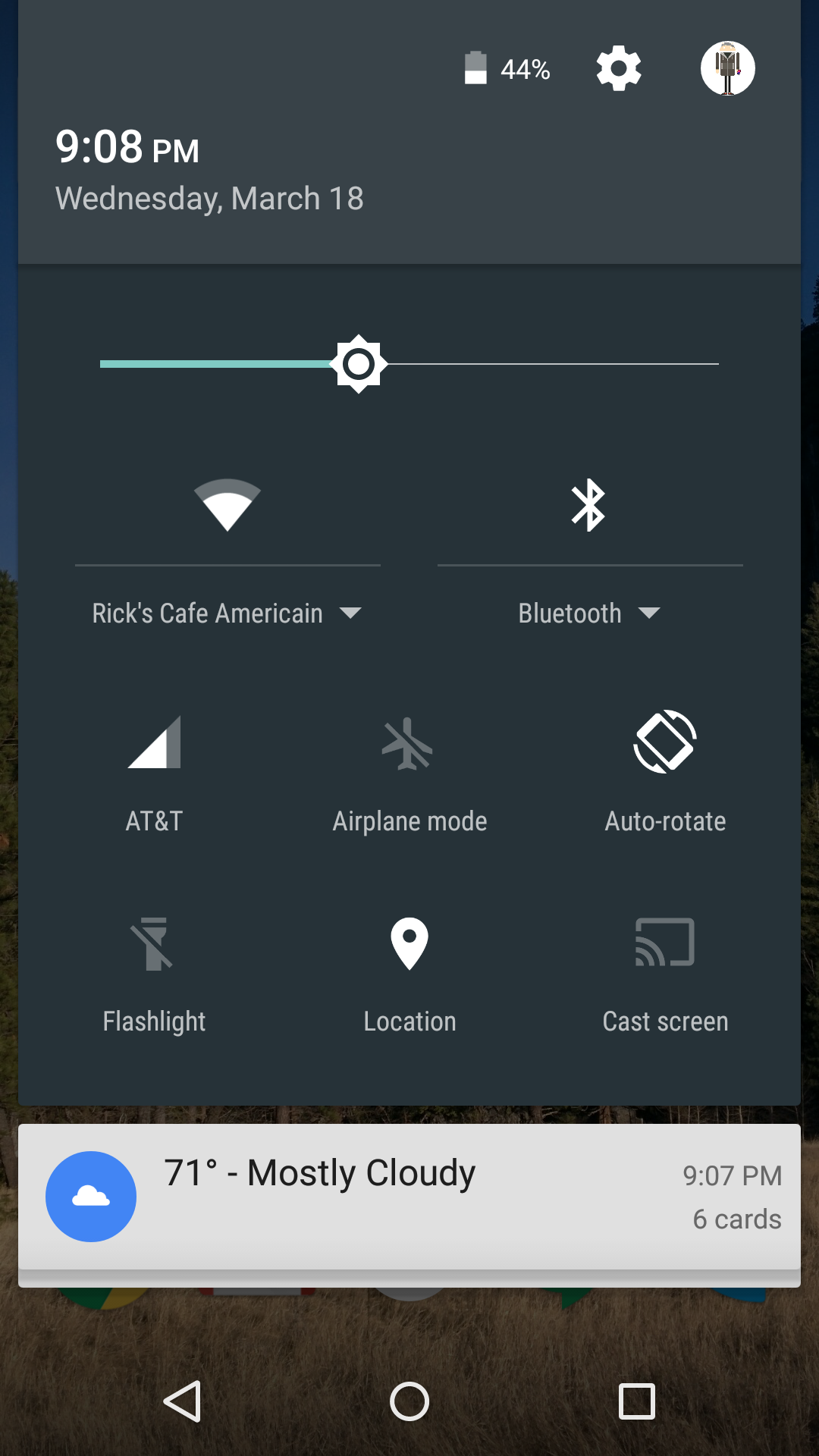
You you can now change which Wi-Fi network and Bluetooth device you’re connected to without the need to maneuver through the settings menu.


When you swipe down with two fingers to the Quick Settings panel, you’ll notice tiny arrows below the Wi-Fi and Bluetooth sections. These indicate a pop-out menu is available. When you touch there, you’ll see a list of available Wi-Fi networks or Bluetooth networks that you’ve previously paired with. Just touch the one you want to switch to it.
Also take note: your Wi-Fi connectivity is getting smarter. Your phone and tablet will remember Wi-Fi connections with limited or no access and won’t reconnect to them in the future. Handy for when you you’re back at that same hotel conference room with the terrible network.

Better security with Device Protection

Security 520x924 The five things Android finally got right with Android 5.1
Android’s new Device Protection feature steps up your phone or tablet’s security. However, it’s only for the Nexus 6, 9, and devices that “ship with Android 5.1.”  So if you have a Nexus 5 you’re out of luck for now.
If your device is lost or stolen, it will stay locked until you sign in with your Google account, even if someone were to perform a factory reset. To enable it, you need to have a secured lock screen with a pin or pattern and be signed in to the device with your Google account.

Improvements to Priority Mode

Priority mode 520x924 The five things Android finally got right with Android 5.1
The Priority Mode first came out with Android 5.0, snoozing alerts until you flipped them back on or for a set period of time. You can trigger it by touching either of the volume buttons.
Now, however, you can set it until your next alarm, which means you can set it right before going to bed and know that notifications will come back to life when you wake up. Android even detects if the alarm is set by a third-party app – not just the default Clock option.
Don’t forget that if you have an Android Wear smartwatch the notification preferences extend there as well.

Volume and Alarm noise changes

volume and alarm 520x924 The five things Android finally got right with Android 5.1
The volume buttons also get smarter when it comes to changing the noise level for audio and the alarm. For example, when you go into the Clock app and press the volume key, it will turn up or down the noise level for the alarm. Previously it would just call up the generic volume adjustment for the sound on the phone. Android will recognize if you’re in a music app and do the same, changing the sound level for the current usage.
Also, whenever you touch the volume button you’ll see an alarm bell next to the sound meter. If you’re in the Clock app, touching the bell will kick you over to the Priority Mode menu. Otherwise, it will instantly put your phone on vibrate.

Multi-SIM and HD voice capabilities finally arrive

HD voice calling nexus 520x822 The five things Android finally got right with Android 5.1
The Nexus 6, and eventually a larger batch of devices that get Android 5.1, will work on networks with HD Voice capabilities. While some Android manufacturers may have built this support in on their own, it will simplify things down the line for this to come as a native feature of Android.
Also, Android will now support phones with a multi-SIM setup. This is useful for international travel as you won’t have to swap out SIM cards when changing from one network to another.
There are a lot of other hidden gems inside Android 5.1, such as some extra animations and an overall zippier performance. If you’re one of the few to be eligible for the update be on the lookout for it. Otherwise, these improvements will at least give you an indication of what the future of Android holds.
Read more...

You can upgrade to Windows 10 from pirated older versions for free, but Microsoft won’t support your system

0 comments

Windows 10


Microsoft made waves over the past few days when it said that it will offer free upgrades to Windows 10 from older versions, included pirated copies. However, there’s no such thing as free Windows: the company says it will not support non-genuine systems after they’re updated to Windows 10.
A Microsoft spokesperson told Ars Technica, “With Windows 10, although non-Genuine PCs may be able to upgrade to Windows 10, the upgrade will not change the genuine state of the license…
“If a device was considered non-genuine or mislicensed prior to the upgrade, that device will continue to be considered non-genuine or mislicensed after the upgrade.”
VentureBeat heard from the company that, “Although non-genuine PCs may be able to upgrade to Windows 10, the upgrade will not change the genuine state of the license.
Non-genuine Windows is not published by Microsoft. It is not properly licensed or supported by Microsoft or a trusted partner.”
It’s likely these non-genuine PCs won’t receive security updates, and their Windows installs may expire after a certain period of time.
Microsoft said it will “provide a mechanism for non-genuine Windows 10 PC devices to ‘get genuine’ via the new Windows Store, whether they are upgraded versions of Windows or purchased. We will have details on this as we get closer to launch.”
That’s not a bad idea. By allowing all users to upgrade to Windows 10 for free, Microsoft will let customers try the new OS and its features for themselves in a more personal manner than, say, an in-store demo.
If the price is right and the process is simple enough, this move could see many more users going legit with their Windows installs.
We’ve contacted Microsoft for more information and will update this post when we hear back.
Read more...

Sound System that Plays Music According to Your Mood

0 comments

BeoSound_Moment_MoodWheel_music_mood-
Music is undoubtedly a thing that delights all of us and we all love to play it. Well, technical minds understand that too. So, Bang and Olufsen created a wireless sound system named ‘BeoSound SMoment’- that can really understand your mood and pick up and play songs that it thinks you would like to hear. This makes your task even easier- just play and listen without any trouble.
Interestingly, BeoSound Moment is a two-sided tablet that plays songs that it thinks you want to hear. The device comes with a full touchscreen panel which uses something we know as ‘Pattern Play’- it learns your listening habits over time and it creates custom mixes based on the music which is played at many times a day.


The system selects tracks from the music-streaming service called Deezer with its over 35-million-songs database plus any song or audio file available on your home network. Smartphones and tablets can also be connected via Bluetooth providing access to services like Spotify and YouTube. Users can listen to Internet Radio via TuneIn or access stored music via iTunes. Users can also plug in their devices for a direct line to their sound system.
BeoSound_Moment_MoodWheel_music_mood
Moment is easy to control once setup. On one side of the device, users can play, skip, rewind a song or alter the volume by just tapping the world’s first touch-sensitive wooden panel made of sports real oak wood – which resembles the iPod’s click wheel. On the opposite side, there is an LCD screen that displays the B&O MoodWheel which is a color wheel that represents different musical styles(red is up-tempo and blue is mellow). I would love to mention that you can tap near the center to play music you’re familiar with or the other option is to go a bit adventurous by tapping around the edges. The device even allows the users to select specific tracks using the LCD screen while there’s an even better option- to sit back silently and listen to your favorite piece of music.
B&O sound system is available exclusively at Bang & Olufsen stores. The price in US is $2,795(approx Rs 1, 77,300), 1795 Euros in UK and 2195 Euros in rest of the Europe.
Read more...

China reveals its secret cyber army and special units to raise cyber war

0 comments

China reveals its secret cyber army and special units to raise cyber war


An updated military document for the first time admits that the Chinese government has a full fledged cyber army for raising cyber wars

Despite several rebuttals and denials by its leadership and the military, it is quite well known that China has specialised cyber warfare units which are ready to launch cyber attacks on orders of PLA and Chinese leadership.
Officially, China has always maintained that it does not sponsor or support any form of hacking.  These denials however came to naught when a latest update in top security military document mentions the existence of such cyber warfare units in China.
The updated The Science of Military Strategy which is a top level military document and an authoritative analysis of China’s military thinking, includes references to China’s cyber-warfare units.
“This is the first time we’ve seen an explicit acknowledgement of the existence of China’s secretive cyber-warfare forces from the Chinese side,” Joe McReynolds of the Center for Intelligence Research and Analysis told The Daily Beast. “[T]hey’ve come out and said, ‘Yes, we do in fact have network attack forces, and we have teams on both the military and civilian-government sides.’”
The Science of Military Strategy which was first published in Chinese in 2001 and translated into English in 2007 has been giving meaningful insights into the workings of the largest army in the world.
The updated edition was published in Chinese in December 2013 and recently become available to foreign analysts. Chinese top leadership and the military is aware that this book is used as a reference point by defense analysts and security strategists.
McReynolds said China has dedicated cyber units operating in both the military and the civilian sphere. The Daily Beast report goes on to state that China has “specialized military network warfare forces” for carrying out both offensive and defense cyber operations and its organisations like, Ministry of State Security and the Ministry of Public Security are “authorized by the military to carry out network warfare operations.”
Chinese Army which has always been shrouded under a cloak of mysteriousness,  had earlier revealed the existence of a 30 member “Blue Army.” “The Blue Army’s main target is self-defense. We won’t initiate an attack on anyone,” a senior PLA official insisted when news of the unit’s existence broke.
Read more...

Pebble teases first ‘smartstrap’ concepts and pledges $1M to their development

0 comments

Pebble smartstrap 2

Although Pebble’s new Time and Time Steelwatches made headlines for their color e-ink displays, arguably their coolest feature is support for interchangeable ‘smartstraps’ that interface with the watch for extra functionality. Still, so far we know next to nothing about what they can actually do.
Pebble is today releasing some concrete details, starting with a $1 million pledge towards the development and support of smartstrap projects. While that may sound a little strange, keep in mind Pebble isn’t actually developing the straps themselves – that’s completely up to third parties.
In the process, it’s also detailed two of its favorite concepts. Seeed Studio’s  (yes, that’s three ‘e’s) modular strap allows you to add a variety of pieces that cover different functionality. Seeed already makes small arduino-compatible moduleswhich will be compatible with the smartstrap interface, so prototyping new features should be easy, according to Pebble.
Pebble smartstrap 2 730x437 Pebble teases first smartstrap concepts and pledges $1M to their development
The second concept is from Spark.io, and it basically would allow your Pebble to connect to a cellular network and be completely independent from your smartphone. The Spark Electron also started as its own Kickstarter project, before being adapted to the smartstrap platform.
Spark Electron Sparkio 730x457 Pebble teases first smartstrap concepts and pledges $1M to their development
Not every project is getting funded of course, but Pebble says it will stand behind the best of them; after all, it lunched on Kickstarter itself. The company recommends developers tweet @Pebble or email them their ideas. Aside from the cash, Pebble will also promote some of the projects on its website and Kickstarter pages.
Smartstraps are a clever way of getting past the limited functionality of smartwatches and potentially adding long-term value. On one hand, not everyone needs GPS or a heart rate sensor. On the other hand, it could enable niche tools like glucose monitoring for users that need it
In a market where people often question the purpose of wearables in the first place, the customized experience could give Pebble a significant advantage over the Apple Watch and Android Wear.
➤ Pebble
Read more...

Microsoft Launches Lumia 430: Cheapest Phone with Windows 10

0 comments

lumia-430-cheapest-lumia-microsoft

Today Microsoft launched its “most affordable Lumia” with its brand new budget smartphone Lumia 430. With this, Microsoft is continuously trying to gain more share of the low-end smartphone segment. At just a sum of $70, Lumia 430 is the cheapest Lumia yet.
If you want all the good features of the most advanced smartphone OS from Microsoft i.e. Windows 10, you don’t need to spend a large chunk of money. Lumia 430 comes with dual-SIM and unlocked functionality, which is a popular feature in emerging markets like India.
With an amount of $70, you will get a  4-inch WVGA screen, 8GB storage space (expandable with microSD card) and 1GB RAM. Lumia 430 is powered by a 1.2GHZ clocking dual-core Qualcomm Snapdragon 200 processor and 1500 mAH battery.
The camera provided at the back is 2-megapixel and 0.3-megapixel VGA camera for okayish selfies.lumia-430-cheapest-lumia-microsoft-
Lumia 430 will available in select regions: Asia-Pacific regions, Middle East, Russia, Africa, Kazakhstan, and Belarus. The phone will be available from April while the India launch is expected to be around the end of April. The cheapest Lumia 430 is expected to cost approximately Rs. 4,400 in India.
“People around the world have responded enthusiastically to our affordable Lumia range. We continue to invest in this segment to ensure that as many people as possible can enjoy signature Microsoft experiences, regardless of budget,” said Jo Harlow, corporate vice president for Phones at Microsoft. “The Lumia 430 Dual SIM continues our commitment to combining the right hardware, software, services and apps with the right price to give people a smartphone they can afford and be proud to use.”

Lumia 430 Detailed Specifications:

Detailed Specifications
GENERAL
Brand/ModelMicrosoft
AnnouncedMarch2015
Form factorTouchscreen
BODY
Dimensions(mm)120.5 x 63.2 x 10.6mm
Weight(g)127.9 gm
DISPLAY
Screen Size4.00 inch
TypeCapacitive touchscreen
Resolution480 x 800 pixels
Pixel Density235 ppi
Colors16M
CAMERA
Primary2-MP, 1600 x 1200 pixel
SecondaryVGA, 480p
FlashNo
SOFTWARE
Operating systemWindows 10
Java SupportNo
HARDWARE
Processor1.2 GHz Quad-core
ChipsetQualcomm MSM8210 Snapdragon 200
RAM1 GB
BATTERY
TypeLi-Ion
Capacity1500 mAh
TalktimeUp to 13h (2G)/ Up to 8h 30 min (3G)
StandbyUp to 720h (2G and 3G)
MEMORY
Internal8 GB
Expandable128 GB
CONECTIVITY
3GYes
BluetoothYes
Wi-FiYes
GPSYes
WLNAYes
Wi-Fi DirectNo
USBMicro-USB
FMYes
HDMIYes
Charging via USBYes
GSM/CDMAGSM
SENSORS
Temperature sensorNo
AccelerometerYes
ProximityYes
BarometerNo
Read more...